---
title: "Faster Loads, Richer Landmarks, and Improved Accessibility: What's New in Zapworks Spaces"
description: "See what's new in Zapworks Spaces: WCAG 2.1 AA accessibility, Accessible QR scanning, richer landmarks, smarter routing, faster loading, and more."
image: https://updates.zap.works/hubfs/Spaces%20update%202x-1.png
---
- [Zappar](https://www.zappar.com/)
- [Zapworks](https://zap.works/)
- [Zapbox](https://www.zappar.com/zapbox/)
- [Blog](https://www.zappar.com/insights/)
- [Contact Us](https://updates.zap.works/contact/)
[Log in](https://my.zap.works/login/) [Free trial](https://my.zap.works/register/?next=/account/add/business/)
[Back](https://updates.zap.works/)
# Faster Loads, Richer Landmarks, and Improved Accessibility: What's New in Zapworks Spaces
 The Zappar Team
Aug 5 2026 8 min read
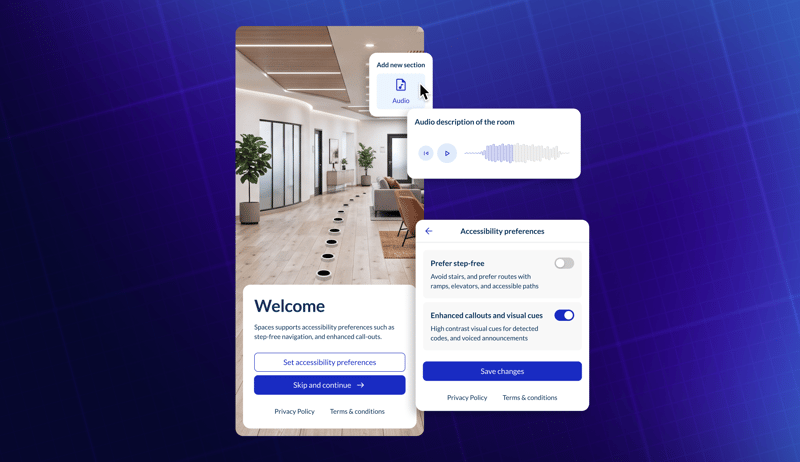
Hello Spaces community! 👋
It's been a few months since our last update and we have been busy. This is one of the biggest releases Spaces has had: improved accessibility built to meet WCAG 2.1 AA guideline, a new way to find accessible QR codes around a space, landmarks that can carry richer custom content with ready-made templates, smarter navigation that thinks about effort the way a person would, and some serious performance gains under the hood.
Here's a quick look at what's new.
### A refreshed look and feel, built around accessibility
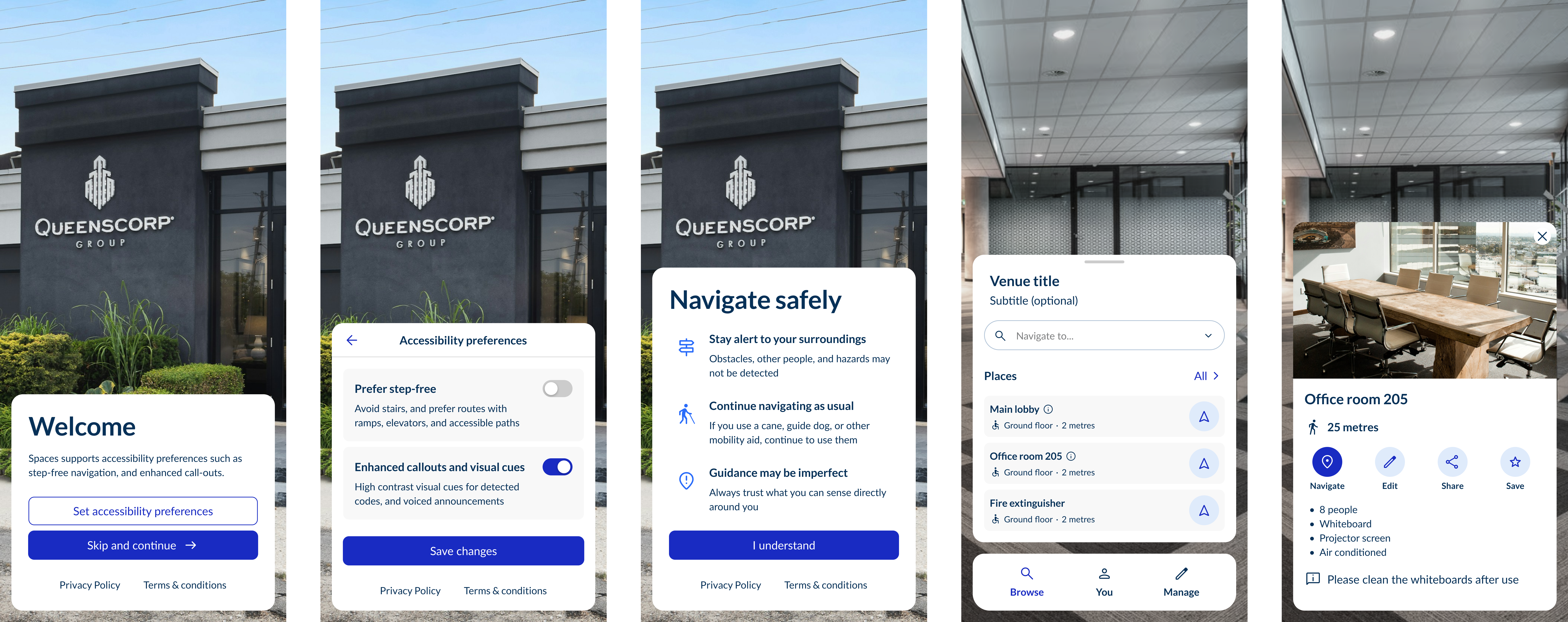
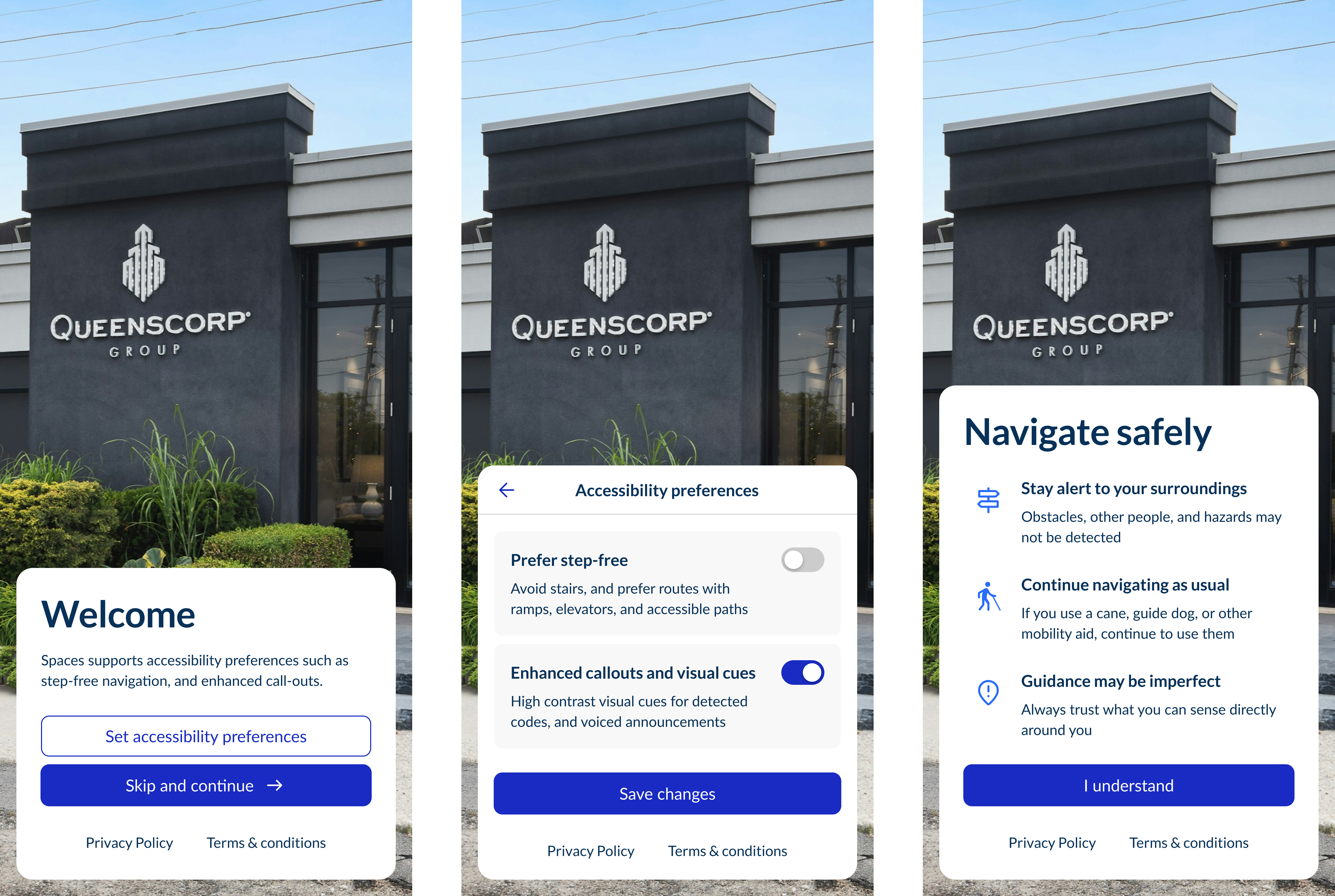
Spaces exists to help everyone find their way around a building independently, so accessibility isn't a nice-to-have; it's the core purpose of the product. With this update, we've gone through the interface properly and rebuilt it to meet [WCAG 2.1 AA guidelines](https://www.w3.org/TR/WCAG21/) throughout.
That covers things like colour contrast, keyboard navigation, screen reader support, and visible focus states, all applied consistently rather than just on the screens visitors see. The editor experience has had the same treatment, so if you're the one building and maintaining a space, that side of things should now be just as accessible to you as it is to your end users.
Accessibility work is never really finished, and we'll keep testing and refining as we go, but this update is a big step toward Spaces looking and working the way it should for everyone using it.
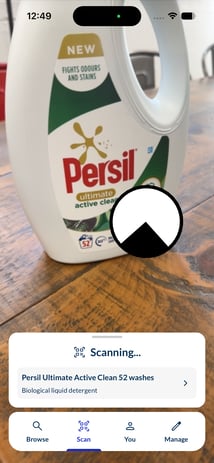
### Accessible QR scanning There's also a new way for people to find specific items, not just rooms. You can now opt in, on a per-space basis, to an [Accessible QR](https://www.zappar.com/zapvision/accessible-qr-codes/) scanning tab for visitors. It lets someone scan an Accessible QR code on a movable item, like a piece of equipment or a product, to identify it or get guided straight to it.
It works with point-of-interest codes already in use in some industrial deployments, as well as the same Accessible QR codes we've been rolling out on consumer products. That means blind and low-vision users can find the exact thing they're looking for, not just the general area it's in.
### Landmarks can now do a lot more
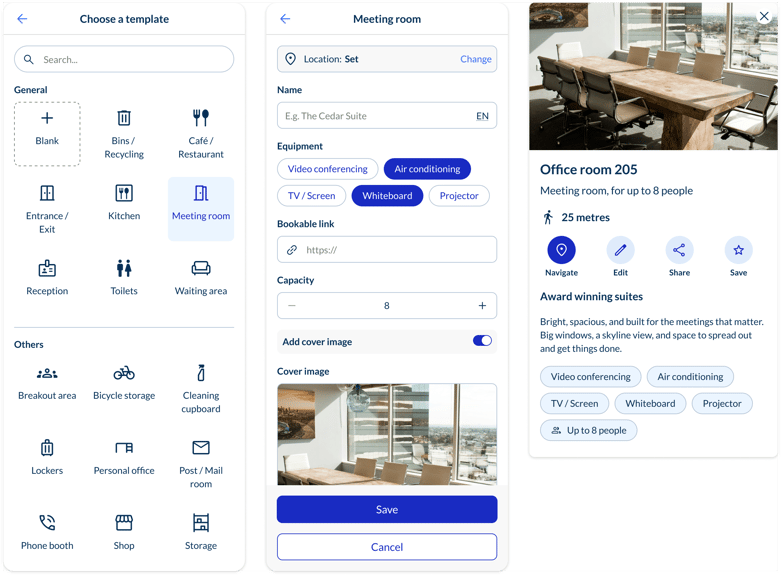
Landmarks can now feature rich content: images, video, audio, and formatted text. That means a landmark can be a photo of a reception desk, a short welcome video, an audio clip with information read aloud, or just a nicely formatted description, whatever suits the space.
Adding them is quicker too. There's now a bank of built-in templates to pick from, each with its own set of fields, so landmarks come out with the right category set automatically. Every template is also available in 10 languages from the start, so you're not translating each one by hand.
### 
### A brand new onboarding flow
New users now get a short onboarding step on their first visit. It covers:
- Accessibility preferences, including the option to prefer step-free navigation
- Spaces-specific terms and privacy information
- Safety guidance before they start exploring
### Routes that think like a person would We've rebuilt how routes get calculated. Stairs now carry more "effort" than flat ground, so a route won't send someone up and down a staircase just because it happens to be shorter in distance than walking around on the same floor. Elevators now carry a fixed boarding penalty too, roughly equivalent to a 20-second wait, so that gets weighed against the alternative.
When someone starts navigating, Spaces now works out which routes are actually available and, where there's a genuine choice, lets them pick:
- **Step-free route**: the fastest route that avoids stairs entirely
- **Direct route**: the fastest route overall, using stairs and elevators as needed
- **Take the stairs**: the fastest route that minimises elevator use
.png?width=250&height=544&name=Path%20(optional).png)
We've also improved floor detection accuracy by excluding outdoor areas from the calculation, so it's more reliable indoors where it matters.
### Get to navigation faster
When browsing or searching for landmarks, you can now jump straight into navigation, or open the full landmark information first. Whichever you need.
### More accurate positioning
We've changed how we call MultiSet to improve accuracy and reduce false positives.
Worth knowing: if you're on MultiSet's free plan, Spaces will now show a MultiSet watermark. [Get in touch](https://zap.works/contact/)to learn more about how to remove the MultiSet watermark.
### Faster loading, less data
Spaces now loads faster and needs less data to do it, anywhere from 2x to 10x less depending on the space. A few things are behind that improvement:
- In AR mode, the 3D model of the space no longer loads its textures. The model's only there for occlusion and hit-testing in that mode, so skipping the textures saves a lot of download time and removes the jank that used to show up once the map finished loading.
- Also in AR mode, meshes that only take up a small amount of the screen are now hidden. Large spaces no longer spend draw calls on meshes that were never going to be useful for occlusion or hit-testing anyway.
- In the other modes, where textures are visible, they now fade in individually as they load rather than popping in all at once. It's a small thing, but it makes loading feel noticeably snappier.
- We're also compressing more of the files behind each map. The 3D model itself is around half the size to download, and the navmesh and space description data are both typically around 10x smaller.
If you're actively working on a Space or want to get these benefits into an existing Space, your VPS map needs to be reprocessed: **Manage > Structure > Maps > \[your map\] > Save**. This same change also fixes an issue where landmark placement could fail on mobile. If you're starting afresh, don't worry about this step.
### Android WebXR is back
Android WebXR support returns for anyone running Chrome 150 or later. We've been working directly with the Chromium team on several fixes to their WebXR support, and this addresses the worst of the problems.
To be honest about where things stand: there are still some keyboard quirks (this build uses a virtual keyboard on Android WebXR), and a few graphical and performance issues remain. We're continuing to work with Chromium on both.
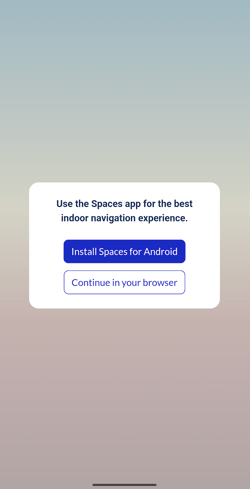
For the end user, they are given an option on first load to either install the Android app or use WebXR for a no-app download, web-based version. Both options should have a near-exact end user experience (excluding the small quirks above).
### Desktop Walk Mode improvements
You can now move around using WASD or the arrow keys, alongside clicking the white footprints. And if you're testing a route in Walk mode and reach an elevator, you'll now get a "Take Me There" option rather than getting stuck.
### A few smaller updates
- Automatically detected floors can now be renamed, so labels match what your team actually calls them
- We've improved localisation throughout, including support for right-to-left languages like Arabic
- Landmark IDs are shorter and easier to read, which makes landmark URLs simpler to work with
- A handful of other interface and usability improvements throughout
### Bug fixes
- Fixed some bugs that could cause strange paths or high concentrations of the black and white breadcrumbs
- Fixed a bug with scrolling lists that could leave the last entry hidden
### Ready to make your space navigable for everyone?
[Get in touch](https://zap.works/contact/) to learn more about making your space easy to navigate for everyone, including sighted, non-sighted and wheelchair users.
What is Zapworks Spaces?
[Zapworks ](https://zap.works/spaces)[Spaces ](https://zap.works/spaces)is an app-free, indoor navigation and wayfinding platform for complex buildings like hospitals, shopping centres, offices, and industrial facilities. Spaces delivers precise, turn‑by‑turn guidance in the browser for blind, low vision and wheelchair users in one shared experience — no app install, no extra hardware, and no ongoing infrastructure maintenance.
AI Summaries:
[Ask ChatGPT](https://chatgpt.com/?q=What%20is%20Zapworks%20Spaces%3F%20Summarize%20https%3A%2F%2Fzap.works%2Fspaces%2F) · [Ask Claude](https://claude.ai/new?q=What%20is%20Zapworks%20Spaces%3F%20Summarize%20https%3A%2F%2Fzap.works%2Fspaces%2F) · [Ask Perplexity](https://www.perplexity.ai/search?q=What%20is%20Zapworks%20Spaces%3F%20Summarize%20https%3A%2F%2Fzap.works%2Fspaces%2F)
 The Zappar Team
- Company
- [Zappar](https://www.zappar.com/)
- [Zapworks](https://zap.works/)
- [Zapbox](https://www.zappar.com/zapbox/)
- [Careers](https://www.zappar.com/jobs/)
Publishing Options
- [Native Apps](https://zap.works/native-apps/)
- [WebXR](https://zap.works/webxr/)
- [AR Web Embed](https://zap.works/ar-web-embed/)
- [Immersal VPS](https://zap.works/mattercraft/immersal/)
- Zapworks Products
- Mattercraft
- [All Features](https://zap.works/mattercraft/)
- [Interactive Websites & Games (Web3D)](https://zap.works/mattercraft/3d-games-and-websites/)
- [Location-Based AR (VPS)](https://zap.works/mattercraft/immersal/)
- [Project Templates & Examples](https://zap.works/templates/)
- Designer
- [All Features](https://zap.works/designer/)
- [No Code AR Training](https://zap.works/training/designer/)
- [AR Web Embed](https://zap.works/ar-web-embed/)
- Universal AR SDKs
- [All SDKs & Features](https://zap.works/universal-ar/)
- Solutions
- We make AR
- [Retail](https://www.zappar.com/solutions/retail/)
- [Packaging](https://www.zappar.com/solutions/packaging/)
- [Learning and Development](https://www.zappar.com/solutions/learning-and-development/)
- [Events](https://www.zappar.com/solutions/events/)
- You make AR
- [Agencies](https://zap.works/agencies/)
- [Educators](https://zap.works/education/)
- [Learning and Development](https://zap.works/learning-and-development/)
- Learn
- [Blog](https://www.zappar.com/insights)
- [Docs & Tutorials](https://docs.zap.works/)
- [Community](https://forum.zap.works/)
- [Competitions](https://zap.works/competitions)
- [Zapworks Training](https://zap.works/training/)
- [No Code AR Training](https://zap.works/training/designer/)
- [Advanced AR Training](https://zap.works/training/studio/)
- [L&D AR Training](https://zap.works/training/learning-and-development/)
- [Mattercraft for Unity developers](https://updates.zap.works/Mattercraft%20for%20Unity%20developers)
- [Mattercraft for Spark Creators](https://updates.zap.works/Mattercraft%20for%20Spark%20Creators)
- [Mattercraft for Three.js Developers](https://updates.zap.works/Mattercraft%20for%20Three.js%20Developers)
- Legal
- [T&C's](https://zap.works/terms/)
- [Privacy Policy](https://zap.works/privacy/)
- [Privacy Notice: B2B Marketing](https://zap.works/privacy-note-b2b-marketing/)
- [Cookies](https://zap.works/cookies/)
- [DPA](https://zap.works/dpa/)
- [User Agreement](https://zap.works/user-agreement/)
- [Content Policy](https://zap.works/unlawful-content-policy/)
- [Refund Policy](https://zap.works/refunds/)
### Company
- [Zappar](https://www.zappar.com/?__hstc=183601593.d7f129bf3851ac1d3d9316d72e2311d5.1742453380903.1758702388795.1758788500302.78&__hssc=183601593.1.1758788500302&__hsfp=548473160)
- [Zapworks](https://zap.works/)
- [Zapbox](https://www.zappar.com/zapbox/?__hstc=183601593.d7f129bf3851ac1d3d9316d72e2311d5.1742453380903.1758702388795.1758788500302.78&__hssc=183601593.1.1758788500302&__hsfp=548473160)
- [Careers](https://www.zappar.com/jobs/?__hstc=183601593.d7f129bf3851ac1d3d9316d72e2311d5.1742453380903.1758702388795.1758788500302.78&__hssc=183601593.1.1758788500302&__hsfp=548473160)
### Publishing Options
- [Native Apps](https://zap.works/native-apps/)
- [WebXR](https://zap.works/webxr/)
- [AR Web Embed](https://zap.works/ar-web-embed/)
- [Immersal VPS](https://zap.works/mattercraft/immersal/)
### Zapworks Products
- Mattercraft
- [All Features](https://zap.works/mattercraft/)
- [Interactive Websites & Games (Web3D)](https://zap.works/mattercraft/3d-games-and-websites/)
- [Location-Based AR (VPS)](https://zap.works/mattercraft/immersal/)
- [Project Templates & Examples](https://zap.works/templates/)
- Designer
- [All Features](https://zap.works/designer/)
- [No Code AR Training](https://zap.works/training/designer/)
- [AR Web Embed](https://zap.works/ar-web-embed/)
- Universal AR SDKs
- [All SDKs & Features](https://zap.works/universal-ar/)
### Solutions
- We make AR
- [Retail](https://www.zappar.com/solutions/retail/?__hstc=183601593.d7f129bf3851ac1d3d9316d72e2311d5.1742453380903.1758702388795.1758788500302.78&__hssc=183601593.1.1758788500302&__hsfp=548473160)
- [Packaging](https://www.zappar.com/solutions/packaging/?__hstc=183601593.d7f129bf3851ac1d3d9316d72e2311d5.1742453380903.1758702388795.1758788500302.78&__hssc=183601593.1.1758788500302&__hsfp=548473160)
- [Learning and Development](https://www.zappar.com/solutions/learning-and-development/?__hstc=183601593.d7f129bf3851ac1d3d9316d72e2311d5.1742453380903.1758702388795.1758788500302.78&__hssc=183601593.1.1758788500302&__hsfp=548473160)
- [Events](https://www.zappar.com/solutions/events/?__hstc=183601593.d7f129bf3851ac1d3d9316d72e2311d5.1742453380903.1758702388795.1758788500302.78&__hssc=183601593.1.1758788500302&__hsfp=548473160)
- You make AR
- [Agencies](https://zap.works/agencies/)
- [Educators](https://zap.works/education/)
- [Learning and Development](https://zap.works/learning-and-development/)
### Learn
- [Blog](https://www.zappar.com/insights?__hstc=183601593.d7f129bf3851ac1d3d9316d72e2311d5.1742453380903.1758702388795.1758788500302.78&__hssc=183601593.1.1758788500302&__hsfp=548473160)
- [Docs & Tutorials](https://docs.zap.works/)
- [Community](https://forum.zap.works/)
- [Competitions](https://zap.works/competitions)
- [Zapworks Training](https://zap.works/training/)
- [No Code AR Training](https://zap.works/training/designer/)
- [Advanced AR Training](https://zap.works/training/studio/)
- [L&D AR Training](https://zap.works/training/learning-and-development/)
- [Mattercraft for Unity developers](https://zap.works/mattercraft-for-unity-developers/)
- [Mattercraft for Spark Creators](https://zap.works/mattercraft-for-spark-ar/)
- [Mattercraft for Three.js Developers](https://zap.works/mattercraft-for-threejs-developers/)
### Legal
- [T&C's](https://zap.works/terms/)
- [Privacy Policy](https://zap.works/privacy/)
- [Privacy Notice: B2B Marketing](https://zap.works/privacy-note-b2b-marketing/)
- [Cookies](https://zap.works/cookies/)
- [DPA](https://zap.works/dpa/)
- [User Agreement](https://zap.works/user-agreement/)
- [Content Policy](https://zap.works/unlawful-content-policy/)
- [Refund Policy](https://zap.works/refunds/)
© 2025 Zappar Ltd.
-
-
-
-
```json
{
"@context" : "https://schema.org",
"@type" : "BlogPosting",
"author" : {
"@type" : "Person",
"name" : "The Zappar Team",
"url" : "https://updates.zap.works/author/the-zappar-team"
},
"dateModified" : "2026-08-05T09:14:17.361Z",
"datePublished" : "2026-08-05T09:14:17.000Z",
"headline" : "Faster Loads, Richer Landmarks, and Improved Accessibility: What's New in Zapworks Spaces",
"image" : [ "https://updates.zap.works/hubfs/Spaces%20update%202x-1.png" ],
"mainEntityOfPage" : {
"@id" : "https://updates.zap.works/spaces-update-richer-custom-landmarks-smarter-routes-and-ui-refresh",
"@type" : "WebPage"
},
"publisher" : {
"@type" : "Organization",
"logo" : {
"@type" : "ImageObject",
"url" : "https://updates.zap.works/hubfs/zappar-logo.png"
},
"name" : "Zappar"
}
}
```