---
title: No Target? No Problem! Introducing 'Show on Screen' in Zapworks Designer
description: Hello everyone! Today we’re thrilled to announce the latest update to Zapworks Designer, featuring some exciting additions, including show on screen.
image: https://updates.zap.works/hubfs/showonscreen.webp
---
- [Zappar](https://www.zappar.com/)
- [Zapworks](https://zap.works/)
- [Zapbox](https://www.zappar.com/zapbox/)
- [Blog](https://www.zappar.com/insights/)
- [Contact Us](https://updates.zap.works/contact/)
[Log in](https://my.zap.works/login/) [Free trial](https://my.zap.works/register/?next=/account/add/business/)
[Back](https://updates.zap.works/)
# No Target? No Problem! Introducing 'Show on Screen' in Zapworks Designer
 The Zappar Team
Sep 29 2025 3 min read
Published January 27th, 2025
Hello everyone!
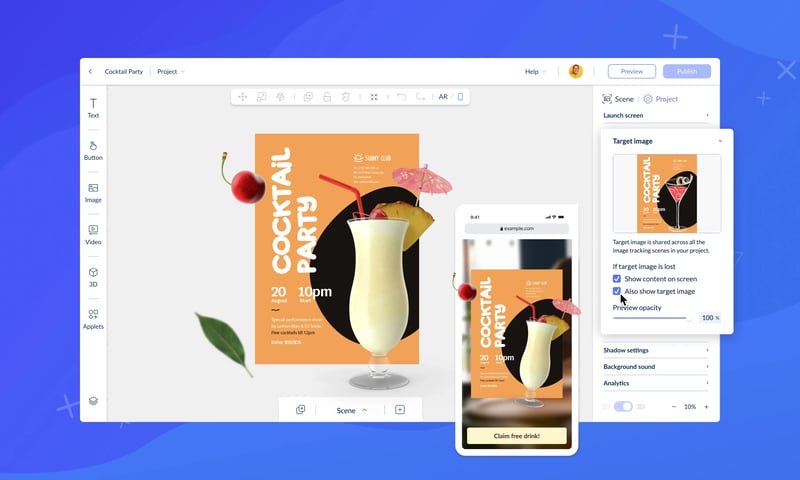
Today we’re thrilled to announce the latest update to Zapworks Designer, featuring some exciting additions that improve both the functionality and user experience. We have introduced the long-anticipated return of a much-loved feature - 'Show on Screen' (Aka 'Grab and Go'), alongside a major update to the template browsing experience.
Let’s dive into the details!
### **Show on Screen**
Tracking content to an image is a mainstay of augmented reality and was the first way that we introduced bringing 3D content into the real world for campaigns all the way back in 2013. But what if the target image isn’t available to the end user?
That’s where Show on Screen comes in.
This feature enables users to simulate an image tracked project without needing the target image in the camera view. It places content directly in front of the camera in 3D and enables intuitive orbit controls, users can now explore experiences seamlessly.
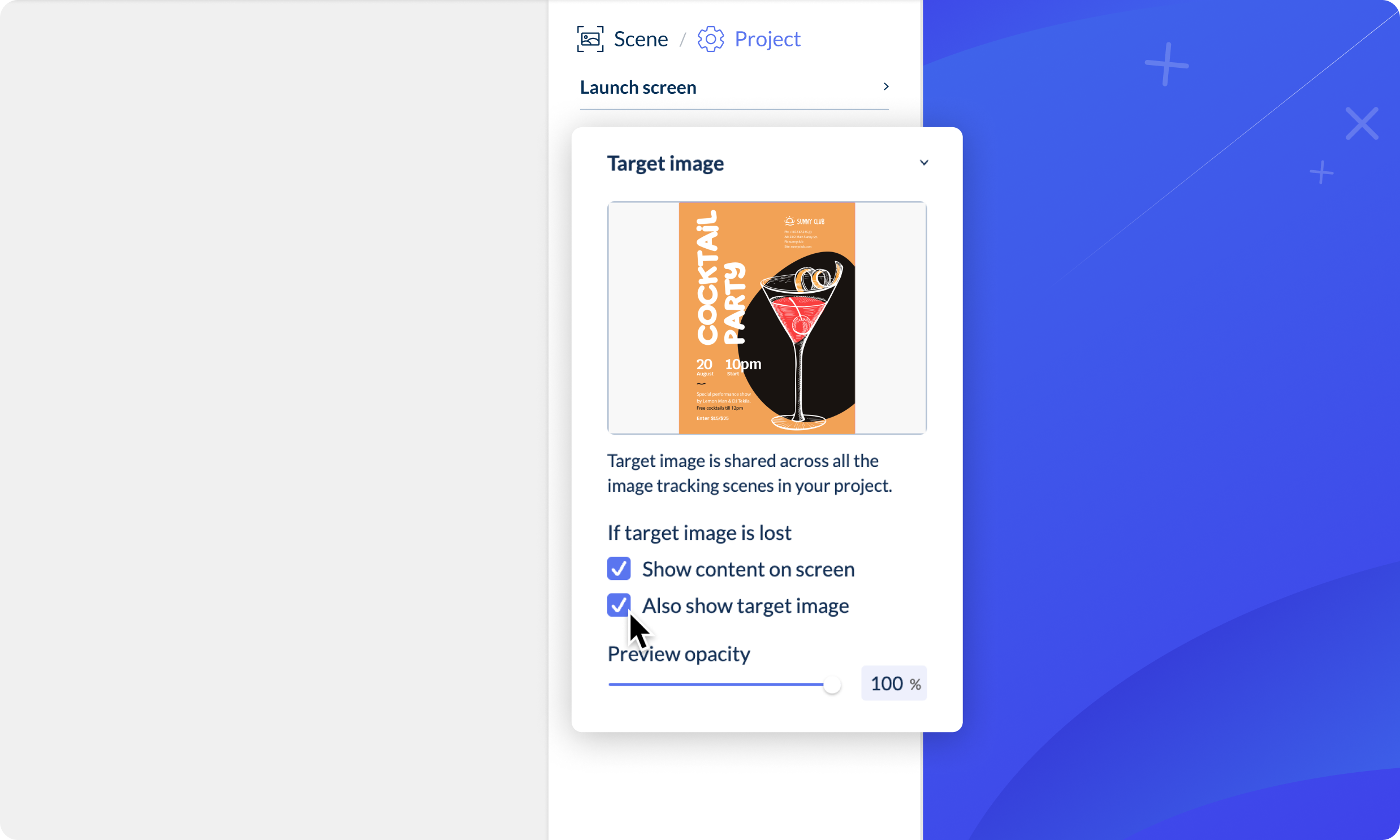
Turning on this optional feature is as simple as checking a box in Designer. Once enabled, the camera will still search for the target image, but if it’s not found, users can tap the 'Show on Screen' button to keep the experience moving. This is perfect for preventing dead ends in your experience design.
For those who’ve used the original Designer, we’re confident this update will bring back core functionality while showcasing how far our no-code tooling has come. If you're still using the legacy version of Designer, there's never been a better time to switch.
### **Updated templates design**
Templates are a fantastic starting point in Designer, offering inspiration for user experiences across a range of industries and use cases but finding the right one hasn’t always been easy.
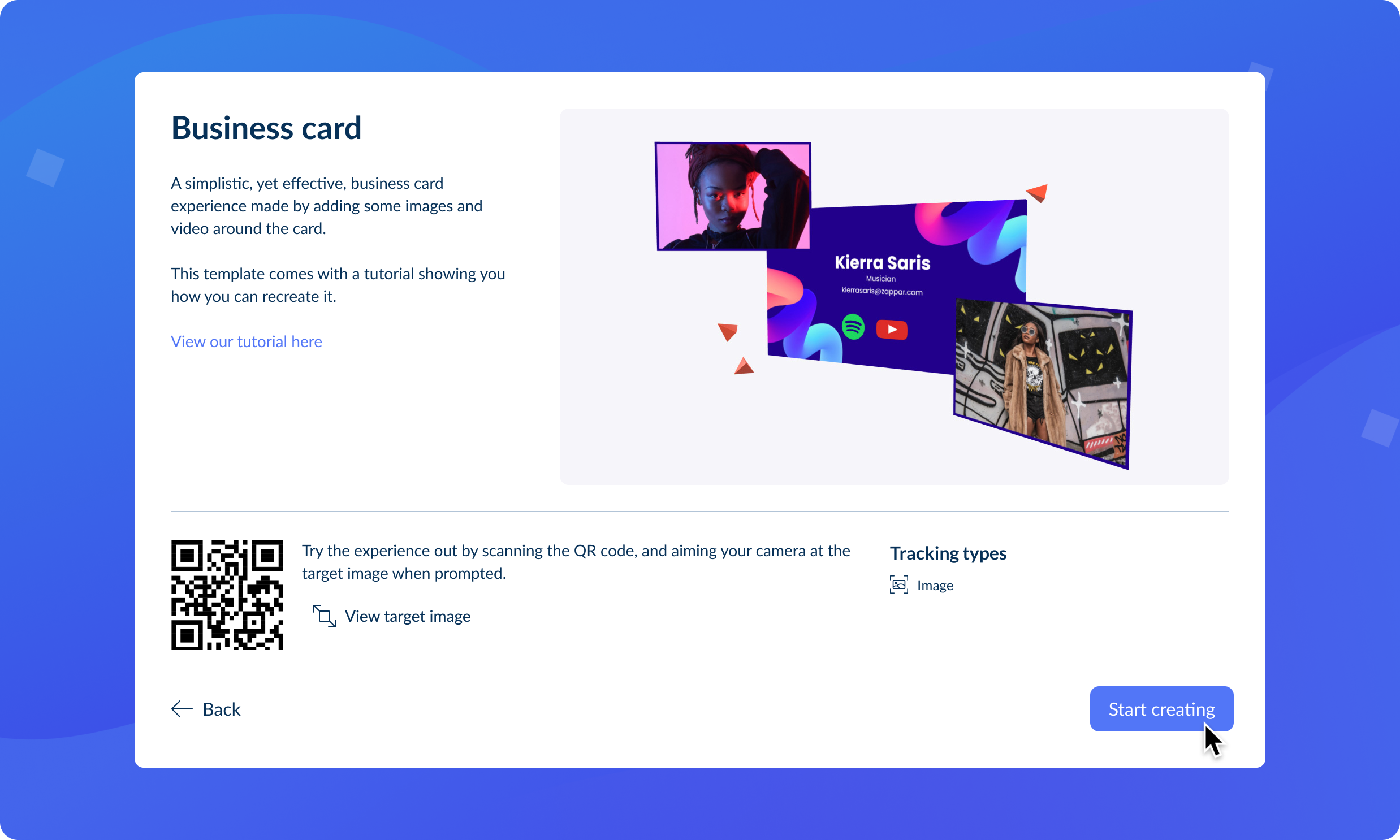
We’ve given the templates browser a significant overhaul, improving discoverability with more detailed information about each template. Even better, you can now scan a QR code to preview templates directly on your device before committing to one.
Remember, you can always overwrite your current project with a new template using the navigation menu at the top of Designer. So, if a template doesn’t quite fit, you can easily try another without starting from scratch.
### **Improved performance of Headset experiences**
With the growing adoption of headsets like the Quest, Pico, and Zapbox, performance is critical. We’re excited to announce infrastructure upgrades that significantly enhance the smoothness of animated and interactive models in headset projects. These updates create a more immersive and natural feel for users, making it the perfect time to explore building for headsets in Designer.
---
### **A big thank you! **
This release is a testament to the incredible work of the Zapworks Designer team, with contributions from documentation, demos, QA, research, marketing, and more. It’s the first major update of 2025, and we’re so excited about the roadmap ahead.
As always, we’d love to hear your feedback! Feel free to share your thoughts or projects with us on [Discord](https://discord.gg/SBzqPRtPZJ).
 The Zappar Team
- Company
- [Zappar](https://www.zappar.com/)
- [Zapworks](https://zap.works/)
- [Zapbox](https://www.zappar.com/zapbox/)
- [Careers](https://www.zappar.com/jobs/)
Publishing Options
- [Native Apps](https://zap.works/native-apps/)
- [WebXR](https://zap.works/webxr/)
- [AR Web Embed](https://zap.works/ar-web-embed/)
- [Immersal VPS](https://zap.works/mattercraft/immersal/)
- Zapworks Products
- Mattercraft
- [All Features](https://zap.works/mattercraft/)
- [Interactive Websites & Games (Web3D)](https://zap.works/mattercraft/3d-games-and-websites/)
- [Location-Based AR (VPS)](https://zap.works/mattercraft/immersal/)
- [Project Templates & Examples](https://zap.works/templates/)
- Designer
- [All Features](https://zap.works/designer/)
- [No Code AR Training](https://zap.works/training/designer/)
- [AR Web Embed](https://zap.works/ar-web-embed/)
- Universal AR SDKs
- [All SDKs & Features](https://zap.works/universal-ar/)
- Solutions
- We make AR
- [Retail](https://www.zappar.com/solutions/retail/)
- [Packaging](https://www.zappar.com/solutions/packaging/)
- [Learning and Development](https://www.zappar.com/solutions/learning-and-development/)
- [Events](https://www.zappar.com/solutions/events/)
- You make AR
- [Agencies](https://zap.works/agencies/)
- [Educators](https://zap.works/education/)
- [Learning and Development](https://zap.works/learning-and-development/)
- Learn
- [Blog](https://www.zappar.com/insights)
- [Docs & Tutorials](https://docs.zap.works/)
- [Community](https://forum.zap.works/)
- [Competitions](https://zap.works/competitions)
- [Zapworks Training](https://zap.works/training/)
- [No Code AR Training](https://zap.works/training/designer/)
- [Advanced AR Training](https://zap.works/training/studio/)
- [L&D AR Training](https://zap.works/training/learning-and-development/)
- [Mattercraft for Unity developers](https://updates.zap.works/Mattercraft%20for%20Unity%20developers)
- [Mattercraft for Spark Creators](https://updates.zap.works/Mattercraft%20for%20Spark%20Creators)
- [Mattercraft for Three.js Developers](https://updates.zap.works/Mattercraft%20for%20Three.js%20Developers)
- Legal
- [T&C's](https://zap.works/terms/)
- [Privacy Policy](https://zap.works/privacy/)
- [Privacy Notice: B2B Marketing](https://zap.works/privacy-note-b2b-marketing/)
- [Cookies](https://zap.works/cookies/)
- [DPA](https://zap.works/dpa/)
- [User Agreement](https://zap.works/user-agreement/)
- [Content Policy](https://zap.works/unlawful-content-policy/)
- [Refund Policy](https://zap.works/refunds/)
### Company
- [Zappar](https://www.zappar.com/?__hstc=183601593.d7f129bf3851ac1d3d9316d72e2311d5.1742453380903.1758702388795.1758788500302.78&__hssc=183601593.1.1758788500302&__hsfp=548473160)
- [Zapworks](https://zap.works/)
- [Zapbox](https://www.zappar.com/zapbox/?__hstc=183601593.d7f129bf3851ac1d3d9316d72e2311d5.1742453380903.1758702388795.1758788500302.78&__hssc=183601593.1.1758788500302&__hsfp=548473160)
- [Careers](https://www.zappar.com/jobs/?__hstc=183601593.d7f129bf3851ac1d3d9316d72e2311d5.1742453380903.1758702388795.1758788500302.78&__hssc=183601593.1.1758788500302&__hsfp=548473160)
### Publishing Options
- [Native Apps](https://zap.works/native-apps/)
- [WebXR](https://zap.works/webxr/)
- [AR Web Embed](https://zap.works/ar-web-embed/)
- [Immersal VPS](https://zap.works/mattercraft/immersal/)
### Zapworks Products
- Mattercraft
- [All Features](https://zap.works/mattercraft/)
- [Interactive Websites & Games (Web3D)](https://zap.works/mattercraft/3d-games-and-websites/)
- [Location-Based AR (VPS)](https://zap.works/mattercraft/immersal/)
- [Project Templates & Examples](https://zap.works/templates/)
- Designer
- [All Features](https://zap.works/designer/)
- [No Code AR Training](https://zap.works/training/designer/)
- [AR Web Embed](https://zap.works/ar-web-embed/)
- Universal AR SDKs
- [All SDKs & Features](https://zap.works/universal-ar/)
### Solutions
- We make AR
- [Retail](https://www.zappar.com/solutions/retail/?__hstc=183601593.d7f129bf3851ac1d3d9316d72e2311d5.1742453380903.1758702388795.1758788500302.78&__hssc=183601593.1.1758788500302&__hsfp=548473160)
- [Packaging](https://www.zappar.com/solutions/packaging/?__hstc=183601593.d7f129bf3851ac1d3d9316d72e2311d5.1742453380903.1758702388795.1758788500302.78&__hssc=183601593.1.1758788500302&__hsfp=548473160)
- [Learning and Development](https://www.zappar.com/solutions/learning-and-development/?__hstc=183601593.d7f129bf3851ac1d3d9316d72e2311d5.1742453380903.1758702388795.1758788500302.78&__hssc=183601593.1.1758788500302&__hsfp=548473160)
- [Events](https://www.zappar.com/solutions/events/?__hstc=183601593.d7f129bf3851ac1d3d9316d72e2311d5.1742453380903.1758702388795.1758788500302.78&__hssc=183601593.1.1758788500302&__hsfp=548473160)
- You make AR
- [Agencies](https://zap.works/agencies/)
- [Educators](https://zap.works/education/)
- [Learning and Development](https://zap.works/learning-and-development/)
### Learn
- [Blog](https://www.zappar.com/insights?__hstc=183601593.d7f129bf3851ac1d3d9316d72e2311d5.1742453380903.1758702388795.1758788500302.78&__hssc=183601593.1.1758788500302&__hsfp=548473160)
- [Docs & Tutorials](https://docs.zap.works/)
- [Community](https://forum.zap.works/)
- [Competitions](https://zap.works/competitions)
- [Zapworks Training](https://zap.works/training/)
- [No Code AR Training](https://zap.works/training/designer/)
- [Advanced AR Training](https://zap.works/training/studio/)
- [L&D AR Training](https://zap.works/training/learning-and-development/)
- [Mattercraft for Unity developers](https://zap.works/mattercraft-for-unity-developers/)
- [Mattercraft for Spark Creators](https://zap.works/mattercraft-for-spark-ar/)
- [Mattercraft for Three.js Developers](https://zap.works/mattercraft-for-threejs-developers/)
### Legal
- [T&C's](https://zap.works/terms/)
- [Privacy Policy](https://zap.works/privacy/)
- [Privacy Notice: B2B Marketing](https://zap.works/privacy-note-b2b-marketing/)
- [Cookies](https://zap.works/cookies/)
- [DPA](https://zap.works/dpa/)
- [User Agreement](https://zap.works/user-agreement/)
- [Content Policy](https://zap.works/unlawful-content-policy/)
- [Refund Policy](https://zap.works/refunds/)
© 2025 Zappar Ltd.
-
-
-
-
```json
{
"@context" : "https://schema.org",
"@type" : "BlogPosting",
"author" : {
"@type" : "Person",
"name" : "The Zappar Team",
"url" : "https://updates.zap.works/author/the-zappar-team"
},
"dateModified" : "2025-09-29T10:28:35.656Z",
"datePublished" : "2025-09-29T10:28:35.000Z",
"headline" : "No Target? No Problem! Introducing 'Show on Screen' in Zapworks Designer",
"image" : [ "https://updates.zap.works/hubfs/showonscreen.webp" ],
"mainEntityOfPage" : {
"@id" : "https://updates.zap.works/no-target-no-problem-introducing-show-on-screen-in-zapworks-designer",
"@type" : "WebPage"
},
"publisher" : {
"@type" : "Organization",
"logo" : {
"@type" : "ImageObject",
"url" : "https://updates.zap.works/hubfs/zappar-logo.png"
},
"name" : "Zappar"
}
}
```